April Fools Day's pranks vanish after April 1, but the deception from scammers never ends.
Springtime marks a peak period for hackers—not due to carelessness, but because everyone is busy, distracted, and rushing through tasks.
That's when the sneaky, almost-convincing scams slip in unnoticed, blending seamlessly into an ordinary workday, only revealing danger once it's too late.
Here are three sophisticated scams targeting sharp, well-intentioned employees right now.
As you review these scenarios, ask yourself: Would my team take the necessary pause to detect each scam?
Scam #1: The Toll or Parking Fee Scam Text
An employee receives a text claim:
"You owe $6.99 for unpaid tolls. Pay within 12 hours to avoid late fees."
The scam uses a legitimate toll system's name—E-ZPass, SunPass, FasTrak—matching the employee's state. The small charge feels harmless.
Temporarily caught between meetings, the employee clicks the link, pays the fee, and moves on.
But the link is fraudulent.
In 2024, the FBI logged over 60,000 complaints about fake toll messages, with a 900% surge in 2025. More than 60,000 fake domains imitate state toll agencies, revealing this scam's massive scale—even targeting people in toll-free states.
The scam succeeds because a small toll fee feels low-risk, and most people have recently used a toll road or parked downtown, making the message believable.
How to protect: Authentic toll agencies never demand instant payment via text message. Employees should avoid clicking text links and instead visit the official website or app to verify charges. Never reply to suspicious texts—even with "STOP"—to avoid confirming your number is active.
Convenience tempts victims; following protocol safeguards your team.
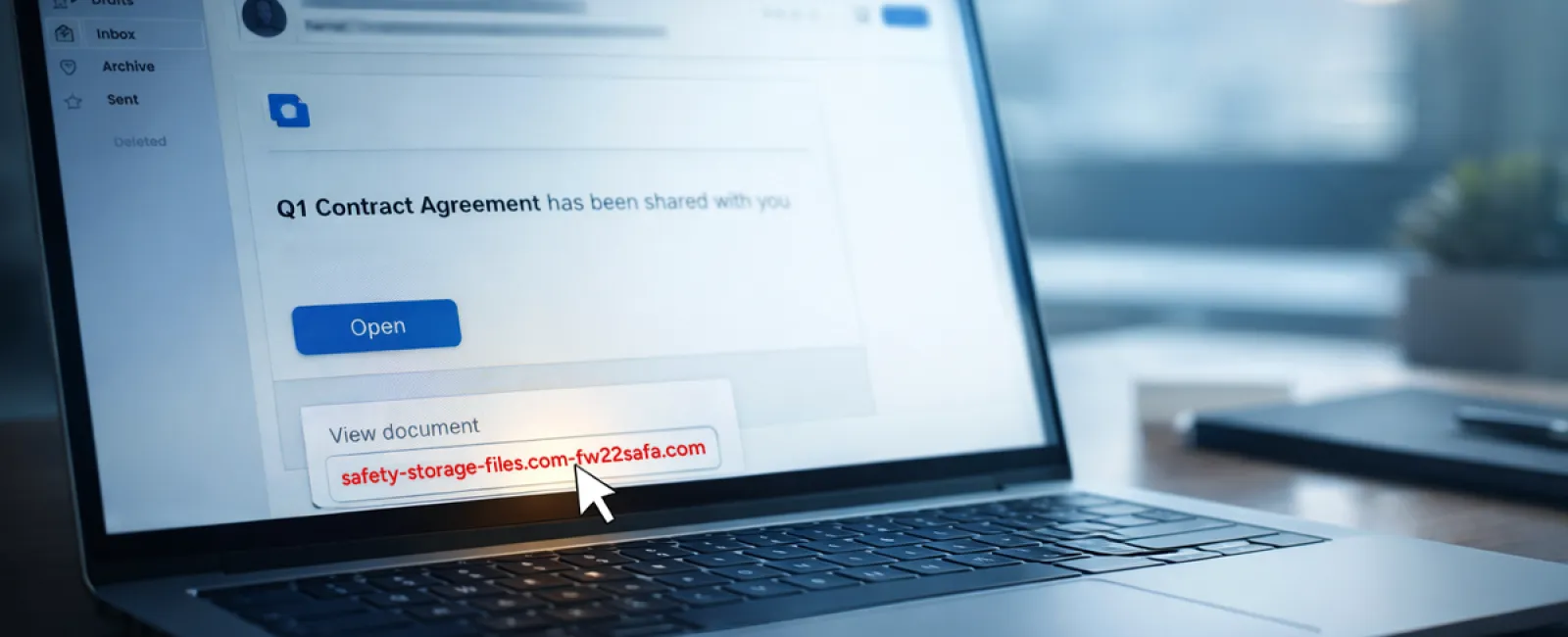
Scam #2: The "Your File Is Ready" Email Trick
This scam integrates flawlessly into daily work.
An employee receives an email notifying them of a shared document—like a DocuSign contract, OneDrive spreadsheet, or Google Drive file.
The sender's name and formatting appear legitimate, closely mimicking authentic file-share alerts.
Upon clicking, the employee is asked to log in, unknowingly handing their credentials to attackers.
Once inside, hackers gain access to your company's cloud infrastructure.
Phishing campaigns exploiting trusted platforms such as Google Drive, DocuSign, Microsoft, and Salesforce surged 67% in 2025, with Google Slides phishing alone doubling recently, says KnowBe4 Threat Labs.
Employees are seven times more likely to trust malicious links from trusted platforms like OneDrive or SharePoint than unknown sources because these notifications appear authentic.
New tactics involve compromised accounts sending file notifications directly from genuine servers, bypassing spam filters.
How to protect: Train your team never to click unexpected file-share links. Instead, employees should access the platform directly via browser. Restrict external file sharing and activate alerts for suspicious login activity—actions your IT team can implement quickly.
Simple caution, powerful protection.
Scam #3: The Perfectly Written Phishing Email
Gone are the days when phishing emails were easy to spot due to poor grammar or odd formatting.
AI-generated phishing messages now perform over four times better than human-crafted ones, with a 54% click rate in 2025, according to recent studies.
These emails sound professional, reference real company names, titles, and workflows—scraped instantly from LinkedIn and websites.
Targets are carefully chosen: HR and payroll receive fake employee verification requests while finance teams get fraudulent payment changes. One study found 72% of employees interacted with vendor impersonation emails—90% higher than other phishing types.
How to protect: Always verify requests involving credentials, payments, or sensitive data via a secondary channel—calls, chats, or in-person. Hover over senders' email addresses to confirm legitimacy, and treat any email that pushes for urgent action as a red flag.
True security doesn't create panic—it demands caution.
The Bottom Line
All these scams depend on familiarity, authority, timing, and the belief that "this will only take a moment."
The real danger isn't careless employees—it's relying on everyone always having time to double-check perfectly under pressure.
If a single rushed click can disrupt your operations, it's a process gap, not a people issue.
And the good news? Process gaps can be solved.
How We Support You
Many business leaders don't want to add another project or become the insecurity educator.
They just want confidence that their business isn't vulnerable.
If you're worried about your team's exposure—or know a colleague who should be—we're ready to talk.
Schedule a clear, no-pressure discovery call to discuss:
- Current cybersecurity risks facing businesses like yours
- Common vulnerabilities hiding in everyday work patterns
- Easy strategies to reduce risk without blocking productivity
No hype. No scare stories. Just practical conversations.
Click here or give us a call at 503-210-5203 to schedule your free Systems Assessment.
If this doesn't apply to you, please share it with a business that would benefit. Sometimes awareness transforms a "would've clicked" into a "nice try."